Stop Rushing Your Invoices: How “PEND” Status Puts Control Back in Your Workflow
If you’ve ever received a vendor invoice only to realize the date is wrong, the tax amount is off, or the GL coding doesn’t match the project scope—you know the frustration. In the agency world, where billable hours and pass-through costs live or die by accuracy, an invoice that’s “almost right” is still wrong. That’s why I’m genuinely excited about e-silentpartner’s latest update: the ability to create vendor invoices in a PEND status, keeping them fully editable until you decide they’re ready to post.
For ad and marketing agencies, precision isn’t just nice—it’s billable. Traditional AP workflows force you to commit too early. Once an invoice hits VOUCHR status, you’re essentially saying, “This is final.” But agency life doesn’t work that way. Maybe a media vendor sent the wrong insertions dates. Maybe a freelance copywriter forgot to break out expenses by job code. With the PEND status, you can now hold invoices in a pre-validation state, correct every field from amounts to job distributions, and only flip the switch when everything aligns with client POs and internal budgets.
The benefits here are tangible. Agencies operate on razor-thin margins and tight reconciliation windows. This feature eliminates the need to “void and redo” or—worse—post incorrect invoices and chase credit memos. According to recent benchmarks, nearly 30% of vendor invoices in creative services require some level of revision. By making those edits before the invoice enters the general ledger, you protect your WIP reports, reduce month-end fire drills, and give your account teams confidence that vendor costs are accurately mapped to the right clients. It also strengthens compliance: auditors love a clean audit trail, and PEND status creates a clear line between “draft” and “posted.”
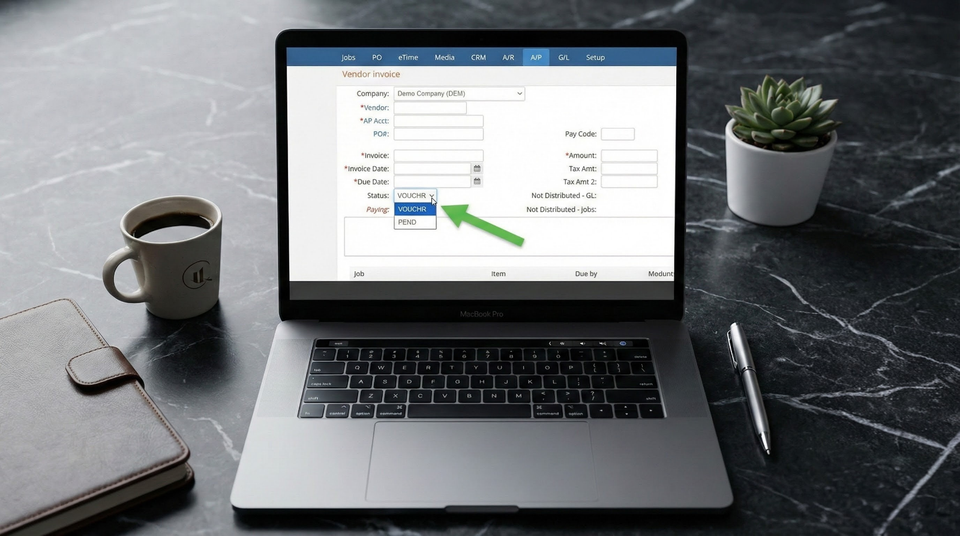
So how does it work? When creating a single vendor invoice (non-expense report), you now have a choice. The default remains VOUCHR—ready to post assuming no GL or job discrepancies. But by selecting PEND, the invoice is saved in a flexible state. Key fields like Invoice Date, Status, Amount, Tax Amt, Tax Amt2, GL Distribution, and Job Distribution all become editable. It’s a simple toggle with massive implications. After years of client requests, this isn’t just a nice-to-have; it’s the kind of workflow sanity that makes agency accountants breathe easier.
TL;DR:
Agencies can now create vendor invoices in PEND status, keeping key fields editable until fully validated. No more posting errors from rushed entries—just cleaner job costing, happier account teams, and fewer late-night corrections.